To allow for shopping time and preparation, try to begin planning your meal 2 days before the delivery date (CaringMeals.com will send you an email reminder 2 days before your delivery date). Let's look at some tips for planning and cooking your meal...
When choosing a meal to cook for someone else, I have found that this generally is not the time to try out a new recipe. Figuring out a new recipe and wondering how the dish will turn out only adds stress. Meals that your family likes are a good place to start. Of course you want to pick one that is easy to pack and transport. If you decide to try something new, make to cook it at least once for your family (if you have the time).
It’s good to have a stock of recipes that have worked in the past. You don’t need too many because typically you'll only take one meal to a family. It really doesn’t matter how many times you take the dish because it is always "new" to the recipient. Besides, the more you make your favorites, the better you get at it and the easier it is to make!
Having said all that, my favorites are Shepherd’s Pie and Stews/Soups. Most adults and children like these. Casseroles can be assembled bit-by-bit over a couple days and can include all the main food groups. Most of them also refrigerate or freeze well.
A Simple Suggested Preparation Schedule:
1. 2 Days Before : Shop and make sure you have all ingredients. Start chopping veggies.
2. Day Before : Start cooking and assembling dish. Make the dessert.
3. Delivery Day : Finish final cooking, packing. Make call to confirm delivery, if necessary.
- Sabina James

Monday, November 30, 2009


Wednesday, November 25, 2009
Gawking at Food
 There are a million recipes online, but when you can see beautiful pictures of the food being prepared, the recipe really becomes inspiring.
For example, take a look at this:
http://iowagirleats.com/2009/11/24/id-marry-this-soup/
Seeing the meal is so much more exciting than just reading about it! If you like what you see, browse all of the pictorial recipes on Iowa Girl Eats.
If you love looking at food (and getting ideas for cooking CaringMeals!), take a look at http://foodgawker.com/. It is user sorted directory (the most popular sites are at the front) of food pictures and recipes from all over the Internet.
Enjoy and Happy Thanksgiving!
Tuesday, November 24, 2009
Do I have to Register??
On CaringMeals, we ask you to create a username and password, before entering the site. Sometimes this may feel like a hassle, but here are all the benefits that we can deliver because you register:
- Friends/Address book: The people on your Friends list on CaringMeals are your addressbook. When it comes time to invite others to bring meals, you know exactly who in your circle of Friends can bring meals. You can even find and add new friends on CaringMeals, which you might not have in your personal email list.
- Security: No anonymous users means that you can control who sees your private information. On other sites that do not require registration, people can come and go, but there is no real record of who viewed your information - CaringMeals is secure.
- Friends' Activity Feed: On your "My Meals" page, you will see a stream of activity (similar to facebook), which shows all of the meals, comments, and plans your friends are posting on CaringMeals. You can keep up on the lastest news, and find opportunities to help bring meals.
- Email Delivery: By verifying your email, we can ensure that the important meal reminders will go to a valid email address (not a mistyped address).
- Saved Settings: Under your profile ("My Profile" link), you can save simple information about yourself such as full name, phone, food likes (so others know what to cook for you), and email preferences. Because this is stored in our database, you don't have to retype this information each time you visit CaringMeals.
- Personalized: At the top of your screen, you will see Recently Viewed Plans. Because you login, we can show you the Plans you viewed most recently. Just one-click, and you can see all the details. If you are coordinating several Plans, this is a great time-saver.
The convenience of not registering may appear to be an advantage, but it leaves many features lacking. By completing our quick registration process, CaringMeals becomes a secure, reliable, and fun place to coordinate all your meals!
If you have any questions, please feel free to contact us at caringmeals@caringmeals.com.
- Friends/Address book: The people on your Friends list on CaringMeals are your addressbook. When it comes time to invite others to bring meals, you know exactly who in your circle of Friends can bring meals. You can even find and add new friends on CaringMeals, which you might not have in your personal email list.
- Security: No anonymous users means that you can control who sees your private information. On other sites that do not require registration, people can come and go, but there is no real record of who viewed your information - CaringMeals is secure.
- Friends' Activity Feed: On your "My Meals" page, you will see a stream of activity (similar to facebook), which shows all of the meals, comments, and plans your friends are posting on CaringMeals. You can keep up on the lastest news, and find opportunities to help bring meals.
- Email Delivery: By verifying your email, we can ensure that the important meal reminders will go to a valid email address (not a mistyped address).
- Saved Settings: Under your profile ("My Profile" link), you can save simple information about yourself such as full name, phone, food likes (so others know what to cook for you), and email preferences. Because this is stored in our database, you don't have to retype this information each time you visit CaringMeals.
- Personalized: At the top of your screen, you will see Recently Viewed Plans. Because you login, we can show you the Plans you viewed most recently. Just one-click, and you can see all the details. If you are coordinating several Plans, this is a great time-saver.
The convenience of not registering may appear to be an advantage, but it leaves many features lacking. By completing our quick registration process, CaringMeals becomes a secure, reliable, and fun place to coordinate all your meals!
If you have any questions, please feel free to contact us at caringmeals@caringmeals.com.
Friday, November 20, 2009
More Friends!
The new "Copy to My Friends" feature is one of the most exciting and powerful tools on CaringMeals. Read on, and I'm sure you will see why...
Here is a scenario:
1. Your Friend coordinates meals on CaringMeals for someone in your group.
2. A few weeks later, another person in your group needs meals, and you would like to coordinate the meals this time.
3. You want to invite everyone who helped the first time, but you don't want to have to find and type all of their email addresses.
What do you do??
There is a Solution!
1. Open the Plan your Friend coordinated before.
2. On the right side, under the "Activity Summary" area, you will see the link "Copy to My Friends" in the Visited This Page section
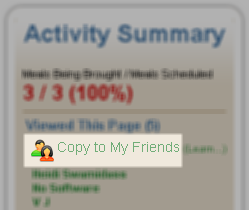
(This link is not visible to the Coordinator, since all of the people on the list are already friends with the Coordinator)
3. Click "Copy to My Friends" and in a few seconds, all of the Friends listed below will be copied to your Friends list.
The next time you want to coordinate meals, you will be able to quickly invite all of the Friends who helped with the previous plan. Without knowing or typing an email address, you can instantly expand your network of Friends.
Just another way CaringMeals helps you coordinate more meals, in less time, with less stress!
Here is a scenario:
1. Your Friend coordinates meals on CaringMeals for someone in your group.
2. A few weeks later, another person in your group needs meals, and you would like to coordinate the meals this time.
3. You want to invite everyone who helped the first time, but you don't want to have to find and type all of their email addresses.
What do you do??
There is a Solution!
1. Open the Plan your Friend coordinated before.
2. On the right side, under the "Activity Summary" area, you will see the link "Copy to My Friends" in the Visited This Page section

(This link is not visible to the Coordinator, since all of the people on the list are already friends with the Coordinator)
3. Click "Copy to My Friends" and in a few seconds, all of the Friends listed below will be copied to your Friends list.
The next time you want to coordinate meals, you will be able to quickly invite all of the Friends who helped with the previous plan. Without knowing or typing an email address, you can instantly expand your network of Friends.
Just another way CaringMeals helps you coordinate more meals, in less time, with less stress!
Thursday, November 19, 2009
First Things First
You want to know what not to make before you start planning. A few simple questions about allergies and likes/dislikes either directly or from the organizer can prevent the awkwardness that results from delivering a meal they cannot or won’t eat.
You also want to know the logistics of delivering the meal, so that the process is as smooth as possible for everyone.
Here are some questions to ask of the receiver when coordinating meals:
Every now and then, there may be many family members and friends present with the friends you want to help. Then the question arises, do you have to feed them all?? In order not to be overwhelmed, I usually plan on the immediate family and add an extra two to four servings. Just let them know how many your meal will feed, so they can inform those who need to fend for themselves. This is your gift to them, so you can make the decision about the size of the meal.
Share your experience with the CaringMeals community! What questions do you ask when coordinating meals?
- Sabina James
You also want to know the logistics of delivering the meal, so that the process is as smooth as possible for everyone.
Here are some questions to ask of the receiver when coordinating meals:
- Are there any allergies?
- What do you like? Dislike? (If have a dish in mind, mention it now and see how they respond.)
- How many people should the meal feed? (If they need to reheat or cook/bake the dish, make sure they have the time and equipment to do it.)
- When can I bring the meal? Ask for a window of time. People need margins.
- Who will be home/available to receive the meal (or where to drop it off, if no one is home).
Every now and then, there may be many family members and friends present with the friends you want to help. Then the question arises, do you have to feed them all?? In order not to be overwhelmed, I usually plan on the immediate family and add an extra two to four servings. Just let them know how many your meal will feed, so they can inform those who need to fend for themselves. This is your gift to them, so you can make the decision about the size of the meal.
Share your experience with the CaringMeals community! What questions do you ask when coordinating meals?
- Sabina James
Tuesday, November 17, 2009
Print a Sigup Sheet
Ideally, when you use CaringMeals, you can reduce or eliminate paper signup sheets and phone tag. However, there are times that having a paper print out of the meal schedule can come in handy (especially when your friends are not yet Internet savvy).
 Now, when you visit a Plan, at the top of the page you will see a "Print" link. That link will take you to a page which does two things:
1. The page is printer-friendly, so it will look clean on paper. As soon as the page opens, you will be prompted to print.
2. For the dates that are not filled, you will see lines to write Name, Phone, and Email for someone to signup.
You can pass this printout around at a get-together, then when you come back to your computer either
- Signup "On Behalf" of the people on the printout
- If they provided an email address, send them an invitation from CaringMeals.
This is just another way to help you coordinate more meals, in less time, with less stress.
 Now, when you visit a Plan, at the top of the page you will see a "Print" link. That link will take you to a page which does two things:
1. The page is printer-friendly, so it will look clean on paper. As soon as the page opens, you will be prompted to print.
2. For the dates that are not filled, you will see lines to write Name, Phone, and Email for someone to signup.
You can pass this printout around at a get-together, then when you come back to your computer either
- Signup "On Behalf" of the people on the printout
- If they provided an email address, send them an invitation from CaringMeals.
This is just another way to help you coordinate more meals, in less time, with less stress.
Sunday, November 15, 2009
Public or Private
You now have a choice when using CaringMeals. We hope it isn't as difficult as choosing between Paper and Plastic, but you can now choose between "Public" and "Private" Plans. Let's see what it can do for you...
On CaringMeals, the main object we are trying to protect is the "Plan" which contains all of the details about who needs then meals, when they are needed, where to bring the meals, and so on. In most cases, this is contains information that should be private among friends, such as emails, phone numbers, addresses, and even health conditions.
With the introduction of our "Public" Plan option, you now have two security choices when it comes to security on CaringMeals:
- Private: This is the default setting and is the most secure. Only people who are Friends of the Plan Coordinator can view a plan. If someone, who is not a Friend of the Coordinator, tries to view a Plan, they will have to send a Friend request to the Coordinator. Once the Coordinator confirms the request, the requestor can view the Plan.
These extra steps add security by preventing unauthorized access, but they also add some complexity to the whole process.
- Public: A Public Plan can be viewed by any registered user - They do not have to be a Friend of the Coordinator. This eliminates the need to send and confirm Friend Requests to gain access to a Plan. From a security standpoint, it means that any one who can get the URL (http://caringmeals.com/plan/YourMeals) can view your Plan.
Each person who visits the Plan will automatically be added to the Friend list of the Coordinator.
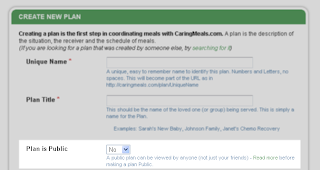
How do I decide which setting to use?
- If the Coordinator will invite people directly from CaringMeals using the "INVITE FRIENDS" button, each invited person is automatically added as a Friend, and they will never have to send a friend request. Choosing a "Private" Plan is the the easy and secure option.
- If you want to invite people using a mailing list, facebook, or at a face-to-face meeting, you may want to choose a "Public" plan. People that try to view your Plan will immediately be able to view the information and signup more quickly to bring a meal. At anytime, you can switch from Public to Private - The users who have already visited the Plan will be able to return at anytime, but new people who are not friends of the Coordinator, will have to send a Friend request.
If you have any doubts or concerns, choose the "Private" option. You can also contact us if you would like further assistance http://www.caringmeals.com/contact.php.
Finding the right balance between security and openness (user-friendliness) is typically a tricky balance. A 100% secure system would have no users, but a totally user friendly system would likely have very little security. Our Public/Private option gives you the power to control and adjust that balance.
On CaringMeals, the main object we are trying to protect is the "Plan" which contains all of the details about who needs then meals, when they are needed, where to bring the meals, and so on. In most cases, this is contains information that should be private among friends, such as emails, phone numbers, addresses, and even health conditions.
With the introduction of our "Public" Plan option, you now have two security choices when it comes to security on CaringMeals:
- Private: This is the default setting and is the most secure. Only people who are Friends of the Plan Coordinator can view a plan. If someone, who is not a Friend of the Coordinator, tries to view a Plan, they will have to send a Friend request to the Coordinator. Once the Coordinator confirms the request, the requestor can view the Plan.
These extra steps add security by preventing unauthorized access, but they also add some complexity to the whole process.
- Public: A Public Plan can be viewed by any registered user - They do not have to be a Friend of the Coordinator. This eliminates the need to send and confirm Friend Requests to gain access to a Plan. From a security standpoint, it means that any one who can get the URL (http://caringmeals.com/plan/YourMeals) can view your Plan.
Each person who visits the Plan will automatically be added to the Friend list of the Coordinator.

How do I decide which setting to use?
- If the Coordinator will invite people directly from CaringMeals using the "INVITE FRIENDS" button, each invited person is automatically added as a Friend, and they will never have to send a friend request. Choosing a "Private" Plan is the the easy and secure option.
- If you want to invite people using a mailing list, facebook, or at a face-to-face meeting, you may want to choose a "Public" plan. People that try to view your Plan will immediately be able to view the information and signup more quickly to bring a meal. At anytime, you can switch from Public to Private - The users who have already visited the Plan will be able to return at anytime, but new people who are not friends of the Coordinator, will have to send a Friend request.
If you have any doubts or concerns, choose the "Private" option. You can also contact us if you would like further assistance http://www.caringmeals.com/contact.php.
Finding the right balance between security and openness (user-friendliness) is typically a tricky balance. A 100% secure system would have no users, but a totally user friendly system would likely have very little security. Our Public/Private option gives you the power to control and adjust that balance.
Subscribe to:
Posts (Atom)