Tuesday, November 17, 2009

Print a Sigup Sheet

Ideally, when you use CaringMeals, you can reduce or eliminate paper signup sheets and phone tag. However, there are times that having a paper print out of the meal schedule can come in handy (especially when your friends are not yet Internet savvy).

Now, when you visit a Plan, at the top of the page you will see a "Print" link. That link will take you to a page which does two things:
1. The page is printer-friendly, so it will look clean on paper. As soon as the page opens, you will be prompted to print.
2. For the dates that are not filled, you will see lines to write Name, Phone, and Email for someone to signup.

You can pass this printout around at a get-together, then when you come back to your computer either
- Signup "On Behalf" of the people on the printout
- If they provided an email address, send them an invitation from CaringMeals.

This is just another way to help you coordinate more meals, in less time, with less stress.

Sunday, November 15, 2009

Public or Private

You now have a choice when using CaringMeals. We hope it isn't as difficult as choosing between Paper and Plastic, but you can now choose between "Public" and "Private" Plans. Let's see what it can do for you...

On CaringMeals, the main object we are trying to protect is the "Plan" which contains all of the details about who needs then meals, when they are needed, where to bring the meals, and so on. In most cases, this is contains information that should be private among friends, such as emails, phone numbers, addresses, and even health conditions.

With the introduction of our "Public" Plan option, you now have two security choices when it comes to security on CaringMeals:
- Private: This is the default setting and is the most secure. Only people who are Friends of the Plan Coordinator can view a plan. If someone, who is not a Friend of the Coordinator, tries to view a Plan, they will have to send a Friend request to the Coordinator. Once the Coordinator confirms the request, the requestor can view the Plan.
These extra steps add security by preventing unauthorized access, but they also add some complexity to the whole process.

- Public: A Public Plan can be viewed by any registered user - They do not have to be a Friend of the Coordinator. This eliminates the need to send and confirm Friend Requests to gain access to a Plan. From a security standpoint, it means that any one who can get the URL (http://caringmeals.com/plan/YourMeals) can view your Plan.
Each person who visits the Plan will automatically be added to the Friend list of the Coordinator.
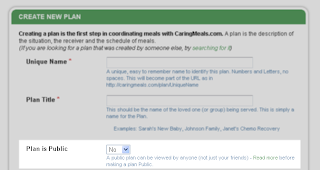


How do I decide which setting to use?
- If the Coordinator will invite people directly from CaringMeals using the "INVITE FRIENDS" button, each invited person is automatically added as a Friend, and they will never have to send a friend request. Choosing a "Private" Plan is the the easy and secure option.
- If you want to invite people using a mailing list, facebook, or at a face-to-face meeting, you may want to choose a "Public" plan. People that try to view your Plan will immediately be able to view the information and signup more quickly to bring a meal. At anytime, you can switch from Public to Private - The users who have already visited the Plan will be able to return at anytime, but new people who are not friends of the Coordinator, will have to send a Friend request.

If you have any doubts or concerns, choose the "Private" option. You can also contact us if you would like further assistance http://www.caringmeals.com/contact.php.

Finding the right balance between security and openness (user-friendliness) is typically a tricky balance. A 100% secure system would have no users, but a totally user friendly system would likely have very little security. Our Public/Private option gives you the power to control and adjust that balance.

Saturday, November 14, 2009

A Different Dream


I recently heard from Jolene Philo, an author and blogger, whose book A Different Dream for My Child: Meditations for Parents of Critically or Chronically Ill Children speaks to parents of special needs children.

She wrote about CaringMeals on her blog: http://www.differentdream.com/2009/11/meal-planning-made-easy/. Often we think of bringing meals when someone has a sudden event in their life (birth, accident, illness, etc.), but think of the long-term care needs in your network of friends. I'm sure there are some parents of special needs children who would be relieved to have meals provided once in a while!

Tuesday, November 10, 2009

On Deck

Here's a quick look at some new features coming to CaringMeals:
- Public Plans: If you are sure that you are not exposing any sensitive information, you can allow anyone to view a Plan you create (not just your "friends"). This will make the process easier by not requiring a friend request for new users. If you choose to keep your plan Private, only your friends can view the information.
- See the Likes/Dislikes of each Plan Receiver: If the Receivers have entered their personal likes/dislikes, you will be able to see their preferences on the Plan.
- Printable Signup Sheet - Ideally, everything can be done online, but there are times when having a paper sheet to show friends at a meeting can help.

Stay tuned for more details!

These features are all drawn from the suggestions of CaringMeals users. If there is a feature you would like to see on CaringMeals, please let us know at http://caringmeals.com/contact.php!

Thursday, November 5, 2009

No Comments?

Comments are one of the best ways to keep everyone informed of the latest news on your plan.
Here are a few notes on using Comments:
- Comments are emailed to the coordinator and each person who signed up to bring a meal. (You will not receive an email notification of your own comment)
- The comments are visible to everyone who can view the plan (All of the coordinator's friends)
- When your friends go to http://caringmeals.com/mymeals.php, they will see all of your comments under their "Friends' Activity" tab.

We are working on ways to further improve comments as a communication tool - stay tuned!

Wednesday, November 4, 2009

Freecycle


For a while now I've been a regular on Freecycle.org. The goal of the site is to keep "stuff" out of landfills, and get it into the hands of those who can actually use it. I am able to give away useful things that I no longer want, and I can ask for things that I have been wanting, all for free-no strings attached! I've received things for my kids and things for my home! Just be careful, perusing the site and picking up items will eat up your time (and gas) if you let it! Always remember to use your head when connecting with others online.
Enjoy!

Sunday, November 1, 2009

You 've Got Mail!

You create a plan, schedule a few meals and invite 20 friends. Then you wait... And wait... Only 3 or 4 people view the plan (you can see on the right side). What is the problem?

1. People don't check their email often (or at all) - Many of my friends (and I'm sure many of yours) do not regularly check their email.
Solution: Call your friends who have not logged in to CaringMeals. If you see others at a meeting (church group, baby shower, party, etc.), just remind them to check their email!

2. Spam Blockers - We take precautions to make sure our emails do not raise suspicions of Spam Blockers, but sometimes overzealous programs can flag our emails as Spam.
Solution: Ask your friends to check their Spam Folder. Also, all of our emails come from caringmeals@caringmeals.com, so you can suggest others add caringmeals@caringmeals.com to their address book.

3. Sign up on behalf of your friends - If you know someone will be unlikely to check their email, but they want to bring a meal, you can use our "On Behalf" feature to signup for a meal.
Solution: See the blog entry No Email, No Problem.

The concept of coordinating meals on the Internet is still a new concept. Getting your group to adopt this new way of doing things may take some time at first, but in the end, we are confident everyone will agree this is a much better (more efficient) way to coordinate meals!